

Remote UPS Management 101: How Network Interface Cards Prevent Costly Site Visits
A UPS can protect equipment from outages, voltage drops, and power surges: but protection is only as effective as your ability to see what the UPS is doing. When a battery begins to fail, a load approaches capacity, or a remote office switches to battery power, you need that information before users discover it through downtime.
A network management card, also called a Network Management Card (NMC) or network interface card, gives your UPS an IP address and connects it to the systems your IT and facilities teams already use. From a secure browser, NMS, DCIM platform, or alerting system, you can monitor UPS health, receive notifications, review event history, and coordinate graceful shutdowns without immediately sending someone to the site.
What Is a UPS Network Management Card?
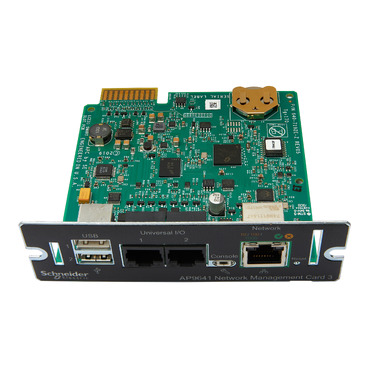
A UPS network management card is a hardware module installed in a compatible communications slot on a UPS. It connects to the local network through Ethernet and provides remote access to operational data and management functions.
Depending on the UPS model and card, you may be able to monitor:
- Input and output voltage
- Input and output frequency
- UPS load percentage
- Battery charge and estimated runtime
- Battery voltage and replacement status
- On-battery, low-battery, overload, and fault conditions
- Internal UPS temperature
- External temperature and humidity sensors
- Event logs and historical operating data
- Controlled outlet groups or load segments
Most enterprise-grade cards provide a web interface and support SNMP integration. That allows the UPS to appear in the same monitoring environment as servers, switches, firewalls, cooling equipment, and other infrastructure.
For example, APC’s NMC3 AP9641 supports 10/100/1000BASE-T Ethernet, HTTPS, SSH, SNMP, IPv4, IPv6, and environmental monitoring. Its Universal I/O ports can connect to temperature, humidity, and dry-contact sensors.
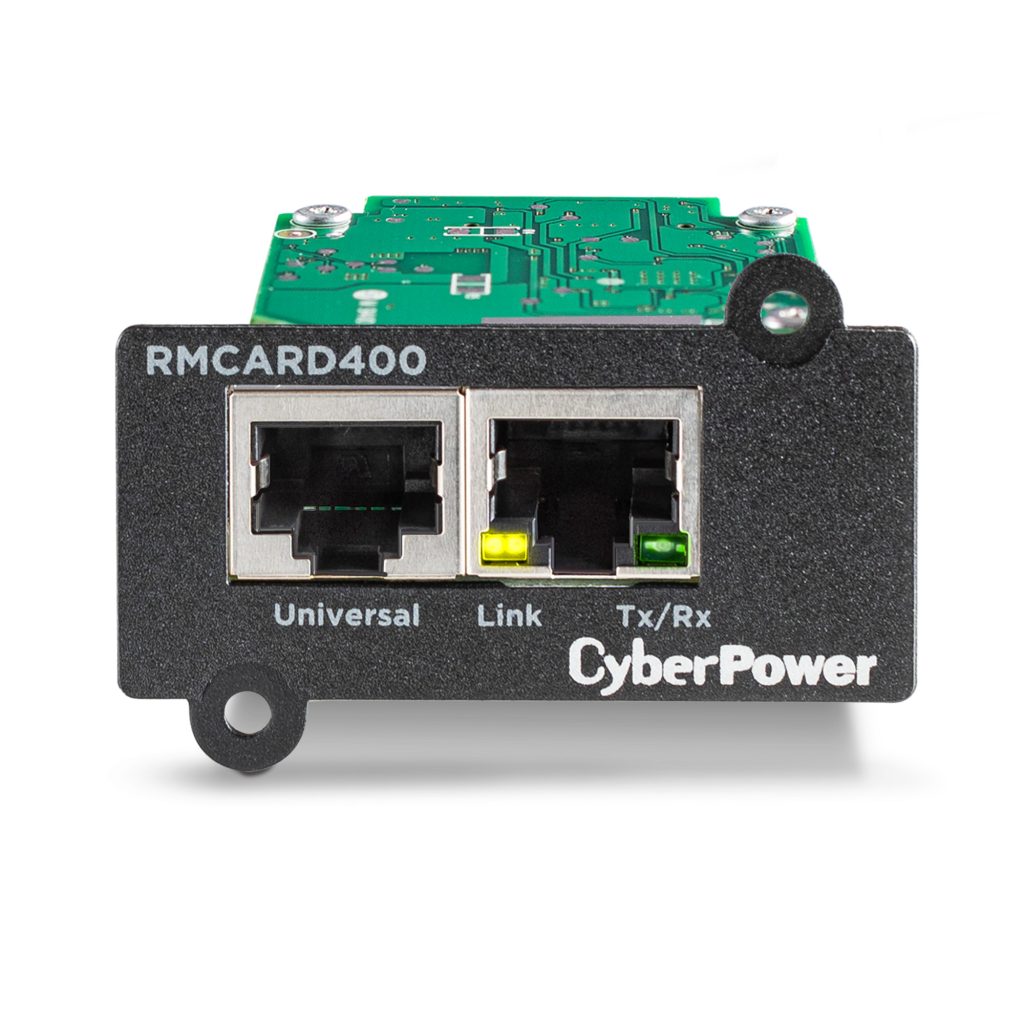
CyberPower provides similar options through products such as the RMCARD400 and RMCARD205. Vertiv uses its Liebert IntelliSlot Unity platform, including the IS-UNITY-SNMP and dual-protocol card family, to connect compatible Liebert UPS systems to web, SNMP, and building management environments.
Compatibility is model-specific. A card designed for one UPS family may not operate in another, so confirm the UPS model, communications slot, firmware requirements, and supported management software before purchasing.
Why Remote UPS Monitoring Matters
Battery problems rarely announce themselves at a convenient time
A UPS may display a normal charge level while its batteries have lost significant capacity. Age, high ambient temperature, repeated discharge cycles, and poor charging conditions can reduce runtime long before a complete failure occurs.
Remote monitoring provides more useful information than a front-panel percentage. IT and facilities teams can review battery condition, runtime estimates, self-test results, and repeated on-battery events. If runtime drops from 18 minutes to six minutes at the same load, that is a maintenance signal: not an issue to postpone until the next outage.
Small load increases can create a large continuity problem
UPS runtime depends heavily on load. A rack that operates at 45% capacity today may reach 75% after new servers, storage, switches, or GPU equipment are installed. More load means less runtime and less margin during a prolonged outage.
A network card lets you track load trends over time. Set an alert when the load exceeds your internal threshold, such as 70% or 80% of rated capacity. The right limit depends on your redundancy design, battery runtime objective, and the requirements of the protected equipment.
Remote sites create an operations gap
Many businesses operate branch offices, retail locations, clinics, schools, warehouses, and edge facilities without full-time technical staff. A local UPS alarm may go unnoticed for hours.
Remote notifications close that gap. Instead of waiting for a user to report that equipment has shut down, the correct team can receive an alert when the UPS switches to battery, reaches a low-runtime threshold, detects an overload, or loses network communication.
Alerts That Lead to Action
A good alerting policy is specific. Sending every available notification to every employee creates alert fatigue and makes important events easier to miss.
Configure notifications for conditions such as:
- UPS operating on battery : Indicates an outage, brownout, loose connection, or upstream electrical issue.
- Low battery or low runtime : Signals that shutdown procedures may need to begin.
- Battery replacement or failed self-test : Creates a scheduled maintenance requirement.
- Overload or high load : Warns that additional equipment should not be connected.
- High temperature or humidity : Helps protect battery life and sensitive electronics.
- Communication failure : Indicates that the UPS may be operating without visibility.
- UPS fault or bypass operation : Requires prompt technical review.
Depending on the vendor and configuration, notifications may be delivered by email, SNMP traps, syslog, mobile applications, or SMS/text messaging. CyberPower’s RMCARD400, for example, supports web and SNMP monitoring with event notifications through email, SNMP traps, and syslog. Vertiv IntelliSlot Unity cards support web access, SNMP, and email or text-based alarm notifications on supported configurations.
SMS should not be treated as a substitute for secure monitoring. It is best used as an escalation channel for high-priority conditions, while the NMS or DCIM platform remains the system of record.
Remote Shutdown: What the Card Does: and Does Not Do
Remote shutdown is often misunderstood. The NMC generally does not issue an operating-system shutdown command by itself. Instead, it communicates UPS conditions to shutdown software installed on servers, hypervisors, or virtual machines.
The sequence typically works like this:
- Utility power fails and the UPS switches to battery.
- The network card records the event and sends notifications.
- The card reports battery runtime or low-battery status to shutdown software.
- Shutdown software warns users or administrators.
- Servers and virtual machines close applications and shut down gracefully.
- The UPS can shut down after the protected equipment has completed its shutdown sequence.
- When utility power returns, configured equipment may restart in a controlled order.
APC commonly integrates its NMC3 cards with PowerChute Network Shutdown. CyberPower systems can use PowerPanel Business software with compatible UPS hardware. Vertiv installations typically integrate the IntelliSlot Unity card with Vertiv management tools or compatible SNMP-aware monitoring and shutdown software.
The shutdown policy should be based on runtime and load: not only on a fixed number of seconds. A server cluster may need several minutes to complete an orderly shutdown, while a network switch may need to remain online longer to preserve communications. Define priorities and test the sequence during a maintenance window.
APC, CyberPower, and Vertiv: Comparing the Options
| Vendor | Network management approach | Best fit |
|---|---|---|
| APC by Schneider Electric | NMC3 cards with web, CLI, SNMP, secure protocols, environmental monitoring, and PowerChute integration | Smart-UPS, larger data center UPS systems, and environments requiring mature enterprise management |
| CyberPower | RMCARD205 and RMCARD400 options with HTTP/HTTPS, SNMP, email, syslog, and compatible PowerPanel software | Small and medium businesses, distributed offices, server rooms, and cost-conscious deployments |
| Vertiv | Liebert IntelliSlot Unity cards with web, SNMP, optional dual protocols, environmental monitoring, and Vertiv platform integration | Liebert UPS systems, data centers, facilities using DCIM or BMS integration |
The best card is not necessarily the one with the longest feature list. Consider the UPS model, number of protected devices, existing NMS or DCIM platform, security requirements, environmental monitoring needs, and whether your team needs automated shutdown.
Ace Real Time Solutions supports APC products and services, CyberPower products and services, and Vertiv solutions. Our role is to match the management hardware and software to the complete power protection design: not simply add a card to an existing UPS.
The Remote UPS Management Roadmap
Use these steps to improve remote UPS visibility today.
1. Inventory every UPS and communications option
Record each UPS model, capacity, location, load, battery age, firmware version, and communications slot. Identify which systems already have a network card and which still rely on a local USB or serial connection.
2. Define the metrics and thresholds that matter
Set practical thresholds for load, runtime, battery replacement, temperature, and communication loss. For example, you might generate a warning at 70% load, a critical alert at 80%, and begin shutdown when calculated runtime falls below the time required for a graceful shutdown.
3. Put the UPS on a controlled management network
Use a dedicated management VLAN where possible. Assign a documented static IP or DHCP reservation, restrict access through firewall rules, and avoid exposing the card directly to the public internet.
Enable HTTPS and SSH where supported. Prefer SNMPv3 over older versions that rely on unencrypted community strings. Change default credentials, use role-based access, keep firmware current, and log administrative activity.
4. Connect the card to your monitoring and shutdown tools
Import the correct vendor MIB into your NMS and configure polling or traps for critical events. Install shutdown agents on servers and virtualization hosts. Verify that the NMC can communicate with those systems even when normal utility power is unavailable.
5. Test the complete response
A dashboard that has never been tested is not a continuity plan. During a controlled maintenance window, simulate a power event and confirm alerts, escalation, runtime reporting, server shutdown, UPS shutdown, and restart behavior. Document the result and repeat the test after major network, server, or UPS changes.
How Remote Management Saves More Than Travel Costs
Avoiding a site visit is only one benefit. Remote UPS management also reduces the time between an event and a corrective action.
A facilities manager can identify a failed battery self-test before the next outage. An IT manager can see that a new rack has reduced runtime below the business continuity target. A remote team can shut down systems safely before batteries are depleted. A service provider can review event logs before dispatching a technician with the correct replacement parts.
That changes maintenance from reactive troubleshooting to planned intervention. It also creates a historical record that helps explain recurring voltage problems, battery degradation, load growth, and environmental conditions.

Build a Real-Time UPS Strategy
A network management card is a small component with a significant operational role. It gives your team visibility into the condition of the UPS, improves response to power events, supports coordinated shutdown, and helps reduce unnecessary travel to remote sites.
However, the card is only one part of a reliable power protection system. Correct UPS sizing, battery maintenance, network security, redundancy, professional installation, and tested operating procedures are equally important.
If you are unsure which card, UPS, battery configuration, or monitoring platform fits your environment, visit Ace Real Time Solutions to request a power audit, download a technical specification sheet, or discuss a customized solution design.
Frequently Asked Questions
What is a UPS Network Management Card?
A UPS Network Management Card is a hardware module that connects a compatible uninterruptible power supply to an Ethernet network. It provides remote access to UPS status, battery health, load, runtime, alarms, event logs, and: in combination with shutdown software: controlled shutdown of protected servers and equipment.
How does remote UPS shutdown work?
When a UPS switches to battery or reaches a low-runtime threshold, the network management card sends the event to shutdown software running on servers, virtualization hosts, or other protected systems. The software closes applications and performs a graceful shutdown before the UPS battery is depleted.
Which UPS network card is best: APC, CyberPower, or Vertiv?
The best option depends on the UPS model, communications slot, monitoring platform, security requirements, environmental sensors, and shutdown software. APC NMC3 cards are designed for APC Smart-UPS and PowerChute environments, CyberPower RMCARD products support compatible CyberPower UPS systems and PowerPanel software, and Vertiv IntelliSlot Unity cards are designed for Liebert UPS systems and Vertiv management platforms.