

Looking For a Storm-Proof Home Office? Here Are 10 Things You Must Know
The rise of the "borderless" workforce has shifted the burden of uptime from the enterprise data center to the spare bedroom and the basement office. For many professionals, a ten-minute power flicker isn't just an annoyance; it’s a severed connection to a high-stakes client call, a corrupted database, or a missed deadline. As extreme weather events become more frequent and the utility grid faces unprecedented strain from electrification, "crossing your fingers" is no longer a viable disaster recovery plan for the remote professional.
We are seeing a massive shift in how remote infrastructure is managed. It is no longer enough to have a fast internet connection. You need a resilient environment that can withstand grid constraints and localized thermal management issues. Whether you are dealing with the humidity of a Florida hurricane season or the unpredictable brownouts of a California summer, your home office needs a "Real-Time Solution" that ensures continuity. The status quo of using a $10 power strip from a big-box store is failing remote workers daily.
Why Now? The Cost of Latency and Failure
The modern home office is essentially a Micro Data Center. You have high-performance workstations, NAS storage, and networking gear that require high-quality power. Any latency in power delivery: the milliseconds it takes for a cheap backup to kick in: can be enough to reboot a sensitive PC or drop a VPN connection. Furthermore, without proper redundancy, a single surge can bypass your basic strip and fry the motherboard of your $3,000 laptop. In a professional environment, this isn't just a hardware loss; it's a productivity catastrophe.
Here is your 10-point roadmap to building a storm-proof home office that keeps you online when the neighborhood goes dark.
1. Implement a Layered Protection Strategy
Think of your power protection like a security system. You want multiple hurdles for a surge to clear before it reaches your equipment.
- Layer 1: Whole-home surge protection at the main electrical panel.
- Layer 2: Point-of-use surge protectors for peripherals.
- Layer 3: Uninterruptible Power Supply (UPS) for critical compute and networking gear.

2. Know the Difference Between Surges and Outages
A common mistake is thinking a surge protector will keep your computer on during a storm. It won't. Surge protectors are designed to "clamp" high-voltage spikes (like those from a nearby lightning strike) and divert them to the ground. To keep working during an actual outage, you need a UPS. Ace Real Time Solutions specializes in sizing these systems so you don't overspend on capacity you don't need or undersize and lose power anyway.
3. Size Your UPS Correctly: VA vs. Watts
Don't just grab the first box that says "Battery Backup." You need to understand the VA (Volt-Amperes) and Wattage ratings. For a standard home office setup: a laptop, two monitors, and a router: you should look for something in the 1000VA to 1500VA range. If you are running a high-end gaming PC or a professional video editing rig, you might need to look at enterprise-grade towers from brands like APC by Schneider Electric or CyberPower.
4. Prioritize Pure Sine Wave Output
Sensitive electronics, especially those with Active PFC (Power Factor Correction) power supplies, can be "picky." Cheaper UPS units output a "Simulated" or "Modified" sine wave which can cause some computers to hum, overheat, or simply shut down. For professional work, always choose a Pure Sine Wave UPS. This ensures the power your computer sees is as clean (or cleaner) than what comes out of the wall.

5. Don't Forget the Network Gear
Your computer is useless if your internet is down. In many cases, the cable or fiber lines outside stay active during a power outage, but your modem and router in the house go dark. Always plug your networking equipment into your UPS. Keeping your 15-watt router powered is much easier than keeping a 400-watt desktop running; a standard UPS can often keep your Wi-Fi alive for several hours.
6. Look for High Joule Ratings
When selecting a surge protector (Layer 2), look at the Joule rating. This is a measure of how much energy the device can absorb before it fails. For home office equipment, you want a minimum of 1,200 Joules. High-end strips from partners like Vertiv or Minuteman Technologies offer even higher protection levels, ensuring that even significant spikes are neutralized.
7. Protect Data Lines (Ethernet and Coax)
Surges don't just come through the power outlets. They can travel through your cable line or your Ethernet cables. If your modem is hit by a surge through the coax line, it can pass that surge directly to your router and then to your computer via the Ethernet cord. Look for UPS units or surge strips that include RJ45 (Ethernet) or Coax protection ports.
8. Understand "Consumable" Protection
Surge protectors are not "buy once, use forever." Every time they absorb a small spike, the internal components (MOVs) degrade. Most modern units have a "Protected" LED. If that light is off, your strip is just a fancy extension cord with zero protection. We recommend replacing point-of-use surge protectors every 3–5 years, or immediately after a major storm event.
9. Maintain Your Batteries
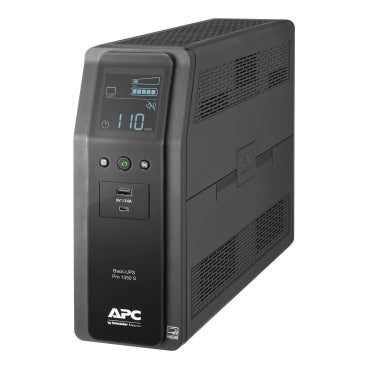
The lead-acid or lithium batteries inside your UPS have a finite lifespan, typically 3–5 years. Many modern units, like the APC Back-UPS Pro, feature user-replaceable batteries and self-diagnostic tests. Don't wait for a storm to find out your battery is dead. Check your UPS status screen or management software regularly.
10. Develop Storm-Time Habits
Hardware is only half the battle. When a severe storm warning is issued:
- Save and Backup: Sync your local work to the cloud or an external drive immediately.
- Unplug Non-Essentials: If you don't need your printer or secondary monitor, unplug them.
- Cooling Matters: UPS units generate heat when running on battery. Ensure there is plenty of airflow around the unit to avoid thermal management shutdowns.
The Storm-Proof Roadmap
If you are ready to stop worrying about the weather forecast, follow these concrete steps today:
- Audit Your Load: Calculate the total wattage of the devices you must keep running.
- Check Your Indicators: Walk around your office and verify the "Protected" lights are green on all strips.
- Upgrade to Pure Sine: If you are using a high-end workstation, swap your basic backup for a Pure Sine Wave model like the APC Smart-UPS 750VA.
- Install a Whole-Home SPD: Contact an electrician to install a Level 1 surge protector at your panel to protect large appliances and office gear simultaneously.
- Get Professional Help: If you have a complex home office or a small business setup, request a power audit from the experts at Real-Time Solutions.

Building a resilient home office is about more than just buying gear; it’s about peace of mind. When the sky turns dark and the lights flicker, you shouldn't have to scramble to save your work. With a tailored solution from Ace Real Time Solutions, you can stay focused on what matters: your work: while we handle the power.
Ready to protect your professional uptime? Visit acerts.com to download a technical spec sheet for our latest APC and CyberPower systems, or request a custom solution design from our power protection experts today.
FAQ: Storm-Proofing Your Power
What is the difference between a surge protector and a UPS? A surge protector only protects against voltage spikes. A UPS (Uninterruptible Power Supply) provides both surge protection and a battery backup to keep your devices running during an outage or brownout.
How does a whole-home surge protector work? Installed at your main electrical service panel, it acts as a gateway that blocks or redirects large external power surges (like from utility switching or lightning) before they can enter your home's internal wiring.
What is a Pure Sine Wave UPS and why do I need it? A Pure Sine Wave UPS provides high-quality, smooth electrical output identical to (or better than) the power from the utility grid. It is essential for modern computers with sensitive power supplies to prevent malfunctions or hardware damage.