

How Long Will a 1500VA UPS Last? Real Runtime at Real Loads
A 1500VA UPS does not provide 1,500 watts of backup power, and it does not guarantee a specific number of minutes. The 1500VA rating is a capacity ceiling. A measure of how much electrical load the UPS can support. Runtime depends on the actual wattage connected to it, the size and condition of its battery, the UPS design, and the operating temperature.
For a practical answer, a typical 1500VA UPS may run a low-power networking stack for several hours, a light office desktop for roughly 20–35 minutes, and a gaming PC or workstation for only a handful of minutes at a heavy load. Those are planning ranges, not promises. The exact model’s manufacturer runtime chart is the final authority.
The State of the Union: 1500VA Is a Starting Point, Not a Runtime Guarantee
Consumers often see “1500VA” on a UPS box and assume the number describes battery duration. It does not. VA describes apparent power capacity, while runtime is governed primarily by watts and the battery’s usable energy. Two UPS units with the same 1500VA label can have different watt ratings, battery packs, efficiency levels, and runtime curves.
For example, a 1500VA UPS may be rated for approximately 865W, 900W, 980W, or 1,000W of real output, depending on the model. An APC Smart-UPS 1500VA model is commonly rated around 980W, while some consumer units are rated at 900W. That difference matters when connecting a gaming computer, multiple monitors, storage devices, and networking equipment.
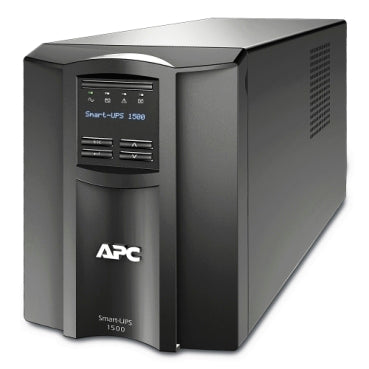
The APC Smart-UPS 1500VA 120V with SmartConnect illustrates the type of tower UPS commonly used for home offices, small businesses, and edge IT environments. Its battery does not deliver the same runtime at every load. A lightly loaded unit may operate for hours; a unit approaching its maximum watt rating may shut down in minutes.
Why Now: Runtime Planning Must Account for Latency and Thermal Management
Power outages are not the only concern. Short voltage dips, brownouts, and unstable utility power can create latency in network equipment, interrupt storage operations, or cause computers to reboot before users notice a complete outage. A UPS bridges those events and provides time to continue working, switch to a secondary connection, or shut down safely.
Runtime planning also has a thermal management component. A UPS operating near its maximum output works harder and produces more heat. The battery also experiences higher discharge stress. A unit running at 90–100% of its watt rating may provide only a few minutes of runtime and may age faster than one operating at a moderate load in a ventilated location.
What Runtime Can You Expect From a 1500VA UPS?
The following ranges represent typical expectations for a standard 1500VA UPS with a new, fully charged internal battery at approximately room temperature. Exact results vary by model.
| Real load | Typical equipment | Approximate runtime |
|---|---|---|
| 50–100W | Modem, router, switch, access point, small NAS | 2–5+ hours |
| 250–400W | Light office desktop, monitor, speakers, networking | 20–35 minutes |
| 500–750W | More powerful desktop, multiple monitors, peripherals | 10–25 minutes |
| 600–900W | Gaming PC or workstation under active load | 5–15 minutes |
| 900–1,000W | Load near the UPS maximum | Approximately 4–10 minutes |
Low-load networking stack: hours
A modem, Wi-Fi router, Ethernet switch, and small security appliance may draw only 50–100W combined. At that load, many 1500VA UPS units can provide two to five hours or more.
This is why a UPS can keep internet connectivity available during a short outage even when it cannot keep a high-performance computer running for very long. If you need internet access during an outage, connect the modem and router to the UPS’s battery-backed outlets, not merely to surge-only outlets.

Light office desktop: tens of minutes
A basic office desktop, one LED monitor, and networking equipment may consume approximately 250–400W. A realistic expectation is 20–35 minutes, assuming a healthy battery and a UPS with a suitable runtime curve.
That is usually enough time to save documents, finish a call, send an outage notification, and shut down cleanly. It is not generally intended to keep a full office operating through a multi-hour outage.
Gaming PC or workstation: a handful of minutes
Gaming PCs and workstations can draw substantially more power when the CPU and GPU are under load. A system with a high-performance graphics card, monitor, speakers, and accessories may reach 600–900W.
At that level, runtime can fall to five to 15 minutes. Near the UPS’s maximum watt rating, runtime may drop to approximately four to 10 minutes. A gaming computer may also have a high instantaneous demand when a game launches or a graphics workload begins, so the UPS must be sized for both continuous watts and load behavior.
VA Versus Watts: Why the 1500VA-to-1500W Assumption Fails
VA, or volt-amperes, measures apparent power. Watts measure real power: the power actually consumed by the equipment. The difference is related to power factor.
A UPS may have a 1500VA / 900W rating, a 1500VA / 980W rating, or another combination. The watt rating is the limit you should use when calculating whether your equipment can be connected safely.

Power factor also helps explain why the rating surprises buyers. Modern computer power supplies often include active power factor correction, but the current and voltage waveform still affect how much apparent capacity the UPS must provide. The UPS therefore cannot necessarily deliver 1,500 real watts simply because its label says 1,500VA.
As a planning rule, keep your normal load well below the maximum watt rating. A target of 40–70% of the UPS’s watt capacity provides useful headroom for startup demand, load changes, battery aging, and future equipment.
The Runtime Planning Roadmap
1. Measure the real load in watts
Do not estimate from the computer’s power-supply label alone. A 750W PC power supply does not necessarily draw 750W continuously. Use a plug-in watt meter, the UPS display, or the manufacturer’s monitoring software to measure the actual load during normal use.
Measure both idle and peak conditions. For a gaming PC, test while playing a demanding game. For a workstation, test during rendering, data processing, or other intensive work.
2. Confirm the UPS watt rating
Find the exact model number and verify its output capacity. A 1500VA unit may be limited to 865–1,000W. Never size equipment using the VA number alone.
Also confirm the output waveform. Modern computers with active power factor correction generally work best with a UPS that provides pure sine wave output, especially when the computer is mission-critical or has a sensitive power supply.
3. Use the exact manufacturer runtime chart
Open the manufacturer’s runtime chart or calculator for your UPS model. Locate your measured watt load, not merely “50% load”, and read the corresponding runtime.
For example, representative 1500VA Smart-UPS charts may show approximately:
- 100W: around 1.5–3 hours, depending on model
- 300W: roughly 30–60 minutes
- 500W: approximately 16–26 minutes
- 700W: approximately 10–14 minutes
- 900–1,000W: approximately 7–10 minutes
Charts are normally based on a new, fully charged battery and controlled test conditions. Treat them as a baseline, not a guarantee.
4. Plan for battery age and temperature
Sealed lead-acid UPS batteries commonly provide about three to five years of service under normal conditions. Heat, frequent deep discharges, and poor ventilation can shorten that interval.
Battery capacity also declines with age. A UPS that delivered 25 minutes when new may provide substantially less several years later. Keep the unit away from radiators, direct sunlight, enclosed cabinets, and other heat sources. Around 25°C / 77°F is a common reference condition for battery specifications.
5. Test runtime periodically
A practical runtime test requires a fully charged UPS, a known load, and a controlled outage simulation. Record the starting load in watts, disconnect utility power, and observe how long the UPS supports the equipment. Stop the test when the UPS reaches its low-battery warning unless a full discharge is necessary for a controlled maintenance procedure.
Do not repeatedly run a high-value workstation until the battery is completely depleted. A periodic partial test, combined with the UPS’s self-test and battery-health reporting, is usually safer. Replace the battery when runtime falls below your required shutdown window or the UPS reports a battery fault.
Transfer Time: Important, but Separate From Runtime
Transfer time is the delay between utility power failure and battery operation. Line-interactive UPS systems commonly transfer in a few milliseconds, often in the single-digit to approximately 10-millisecond range depending on the model. Most modern computers and networking devices can ride through this transition.
An online, double-conversion UPS has effectively zero transfer time because the load is continuously supplied through the inverter. That design is more common for sensitive enterprise, medical, and data-center equipment than for ordinary home offices.
Transfer time affects whether equipment reboots during an outage. It does not significantly increase or decrease the total battery runtime.
Bottom Line: How Long Will a 1500VA UPS Last?
A 1500VA UPS may last hours at a low networking load, tens of minutes with a light office setup, and only a handful of minutes with a gaming PC or workstation under heavy load.
The decisive number is your actual watt draw. Check the UPS’s watt rating, measure your equipment, use the exact manufacturer runtime chart, and account for battery age and temperature. If your requirement is to work through a long outage rather than shut down safely, you may need a larger UPS, external battery packs, a generator, or a coordinated backup-power design.
Ace Real Time Solutions designs and supports power protection for home offices, small businesses, and critical IT environments. Visit acerts.com to request a power audit or solution design, review available UPS systems, or contact our team for help matching runtime to your actual load.
Frequently Asked Questions
What is the typical runtime of a 1500VA UPS?
A typical 1500VA UPS may run a 50–100W networking stack for two to five hours or more, a 250–400W office setup for approximately 20–35 minutes, and a 600–900W gaming or workstation load for roughly five to 15 minutes. The exact runtime depends on the model, battery condition, temperature, and load.
How does a 1500VA UPS differ from a 1500W UPS?
VA measures apparent power, while watts measure real power. Most 1500VA UPS units are rated below 1500W, often around 865–1,000W. Use the manufacturer’s watt rating when sizing equipment and estimating runtime.
How can I improve the runtime of a 1500VA UPS?
Reduce the connected watt load, remove nonessential monitors and peripherals, keep the UPS ventilated, replace an aging battery, and choose a model with external battery capability if longer runtime is required. Use the manufacturer’s runtime chart to confirm the expected result.